Facebook Ad Audit: How to Find Hidden Leaks in a Facebook Ads Account
A diagnostic method built on $147M+ in managed ad spend across Meta and Google. Run in order. Run it on any Facebook ads account in 4 to 6 hours.
Founder, BTB Audits. $147M+ in ad spend managed across Meta and Google
| What to check | Why it matters | Most common leak |
|---|---|---|
| Pixel + Conversions API | Bad data invalidates every conclusion downstream | Wrong event firing for months. Algorithm trained on noise |
| Campaign structure | Readable structure beats clever-looking setups | Junk-drawer of copy-of-copy campaigns nobody designed |
| Account stage | Same finding means three different things in three stages | Cost-cut account run with a scaling playbook |
| Cross-platform check | Meta tells one story, Shopify tells another | Mobile checkout silently broken for 18% of buyers |
| Creative variety | Creative is the new targeting in 2026 | One pitch, ten variants, no angle range |
Most Facebook ad audit guides online open the same way. They define what an audit is. They list ten generic checks like "review your CPM" (cost per 1,000 ad impressions) and "check your audience overlap." Then they pitch a free audit at the end.
This guide skips that.
Facebook is still the largest social platform in the world, with 3.07 billion monthly users as of Q4 2025 per Meta's investor data. That scale is why $10K to $500K a month in Facebook ad spend is now a normal range for a mid-sized brand selling direct to consumers. When ROAS (return on ad spend, total revenue divided by ad spend) wobbles at that spend level, the problem is almost never the thing on the surface. It is the layer underneath. The dashboard nobody can read. The Pixel (the small piece of code Facebook puts on a website to track sales) that has been firing the wrong event for six months. The campaign structure that started clean two years ago and turned into a junk drawer.
What follows is the actual method run when a new account lands on the BTB Audits desk. Ten steps. In the order they get run. With the diagnostic at each step that tells the auditor whether to keep going or stop and write the first finding.
A focused operator who knows their account can run this in 4 to 6 hours. The method is open. The diagnosis takes practice.
What separates a real Facebook ad audit from a sales pitch
Most "free Facebook ad audits" exist as sales tools dressed up as diagnostics. The findings get calibrated to create just enough anxiety to close a retainer. A real audit is calibrated to find leaks the brand can fix this week.
Five tests separate the two:
1. Sequence, not flat checklist
A real audit runs in an order. Each step has a prerequisite. Checking creative before checking the Pixel is wasted work, because if the Pixel is wrong, the algorithm has been training on bad data and the "winning" creative is winning fiction.
If a tickable line-item version is more useful for a recurring monthly pass, the complete Facebook ads audit checklist turns this same diagnostic into yes-or-no checks (with a printable PDF). Read the method below first so the order makes sense, then run the checklist quarterly.
2. Data trust before performance grading
The first non-obvious step is verifying that the numbers on the dashboard are real. Pixel firing once. Conversions API (CAPI, Meta's server-side way to send sales events) sending the same events with no duplicates. Event Match Quality (EMQ, Meta's score from 1 to 10 for how well an event matches a real person) above 6. Skip this and every later finding is suspect.
3. Reads three platforms, not one
Most cheap audits never leave Meta Ads Manager. A real audit reconciles Meta, Shopify, and an analytics tool. Most leaks live between the ad and the cash register. Meta cannot see them.
4. Diagnoses the account stage before recommending fixes
A campaign with a 2.8x ROAS is a winner in a scaling stage, a steady performer in an optimization stage, and a cut candidate in a cost-cut stage. The same finding reads three ways. Skipping this step is why most audit advice doesn't match the business reality the founder is living.
5. Ships findings with dollar impact and a fix order
A real audit attaches a leak score and a fix order to each finding. "Your audience targeting needs work" is not a finding. "Stage 7 leak: 18% of mobile checkouts time out at the address-entry step. Estimated impact: $7,200/month at current ad spend. Fix first." That is a finding.
For the full worldview that frames why this distinction matters across the whole audit category, see the Honest Audit Manifesto.
Why most Facebook ad audits are calibrated to sell, not solve
Free agency audits exist for one reason. They are a sales tool dressed up as a diagnostic.
The pattern is consistent. A junior gets handed a template. They open Ads Manager, screenshot a few high-CPM ad sets, write "your audience targeting needs work," and the senior who pitched the audit signs off. The diagnostic was never the product. The retainer was the product.
The other failure mode is the opposite. Auditors who try to help, but stop at the surface. They review the campaigns and call it a day. They never check whether the Pixel is firing right. They never look at Shopify. They never ask which stage the account is actually in.
Both miss the same thing. Most leaks aren't in the ads. They're in the system around the ads.
The 10 steps below find both kinds of leak. The shallow ones a junior could catch. And the structural ones that take ten years of pattern-matching to see.
For a deeper breakdown of why free audits often miss the leaks that matter, see free ad audits calibrated to sell and the free Facebook ads audit vs paid comparison.
Step 1: Dashboard hygiene (the 30-second smell test)
A real audit doesn't grade the campaigns first. It checks whether the operator can even read the account.
The first 30 seconds of the audit look at three things:
- Is there a custom column view set up?
- At one glance, are CPM, CTR (click-through rate, clicks divided by impressions), CPC (cost per click), CPO (cost per order), ROAS, and AOV (average order value) all visible?
- AOV is not a default Meta column. Has someone built a custom one?
If the column view is Meta's default (three columns, no custom layout), the audit already has finding number one. Nobody has been seriously looking at this account. The account hasn't been managed. It has been checked on.
A messy dashboard is a messy operation. The signal is that strong.
If the dashboard is clean, the audit moves on. If it is not, that is finding number one. The column view gets rebuilt before any other finding is written, because every number that gets looked at next has to be readable in context.
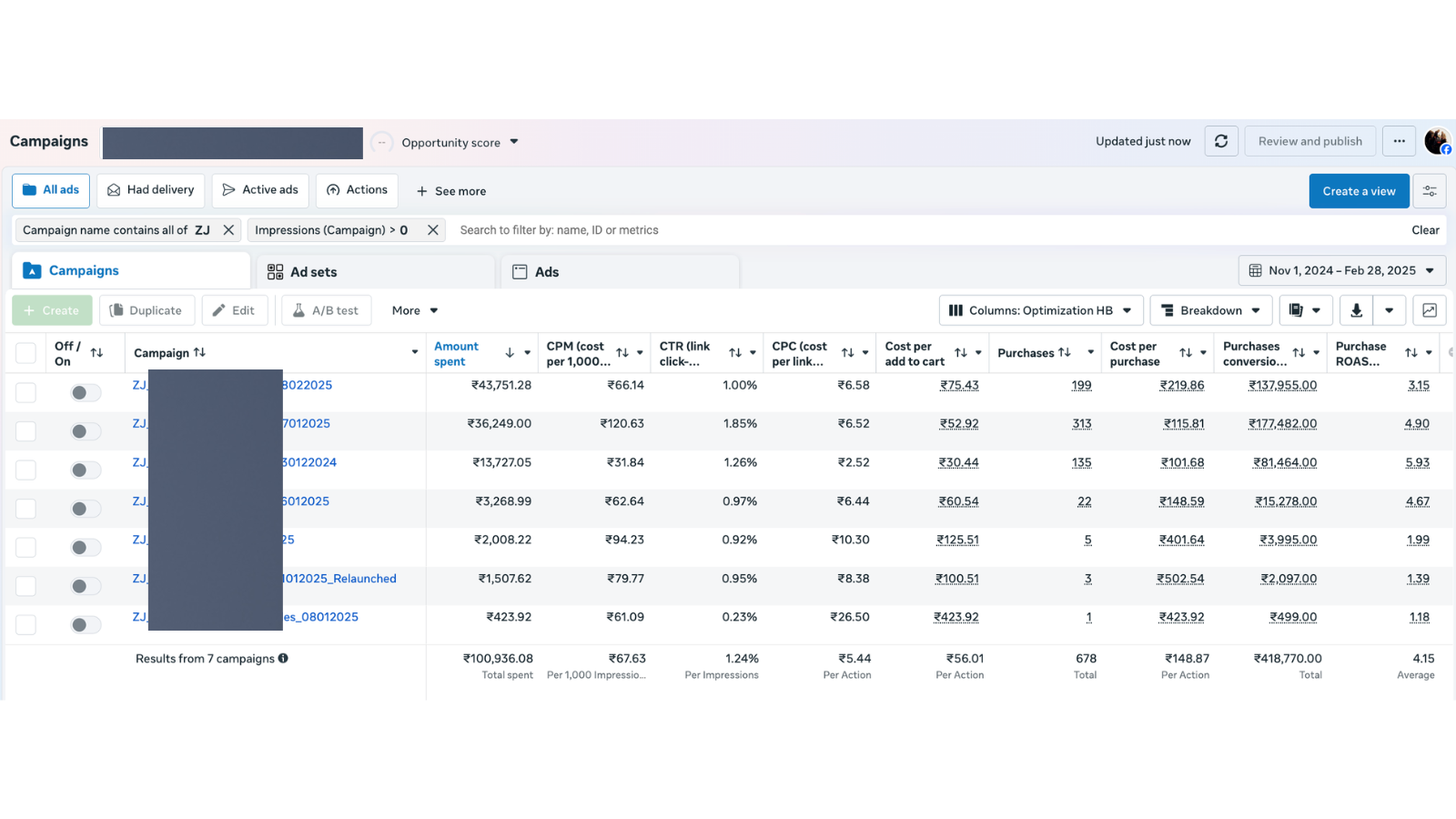
What the column view in a managed account actually looks like. The 30-second smell test passes when every yield and cost metric is readable without opening anything.
Step 2: Pixel and Conversions API. Is the data real?
Before a single number on the dashboard gets trusted, the data underneath it gets checked.
This is the gate. If the Pixel is wrong, every conclusion drawn after it is wrong. The audit would be auditing fiction.
What gets checked:
- Pixel connected to the right page (and only the right page)
- All the right events firing once: Page View, View Content, Add to Cart, Begin Checkout, Purchase, Lead
- Conversions API set up alongside the Pixel, with no duplicates
- EMQ scores above 6 for the events that matter
A composite example. Take a supplements brand spending around $80K a month on Facebook ads. Reported ROAS sat at 2.4x. The team was confused because the P&L (profit and loss report) said the business was bleeding cash.
The Pixel had been firing "Add to Cart" on every product page view for fourteen months. So Meta's algorithm was optimizing for a fake event. Every dollar spent was teaching the algorithm to find people who looked at products. Not people who bought them.
That is not a creative problem. That is not a targeting problem. That is a data problem. And no amount of campaign optimization fixes it.
Skip step 2 and the next eight steps can be done perfectly and the audit will still be wrong about everything.
For the full breakdown of Pixel + CAPI deduplication and the 5-step verification, see the Conversions API setup guide.
The reason most accounts at $50K+ monthly spend cannot see their own leaks is that the agency's monthly ROAS report inflates by 30 to 50 percent via attribution double-counting across Meta and Google. The inflation hides the structural problems this audit method surfaces. Fix the Pixel first. Then reconcile the reported ROAS against the bank account. Then the next eight steps can do their job.
This stage matters because Meta's reported numbers will diverge from Shopify regardless of how clean the Pixel is. The attribution model is built that way. For the full platform-mechanics breakdown of why Meta, Google, and Shopify never reconcile, see why your ad reports show 3 different numbers.
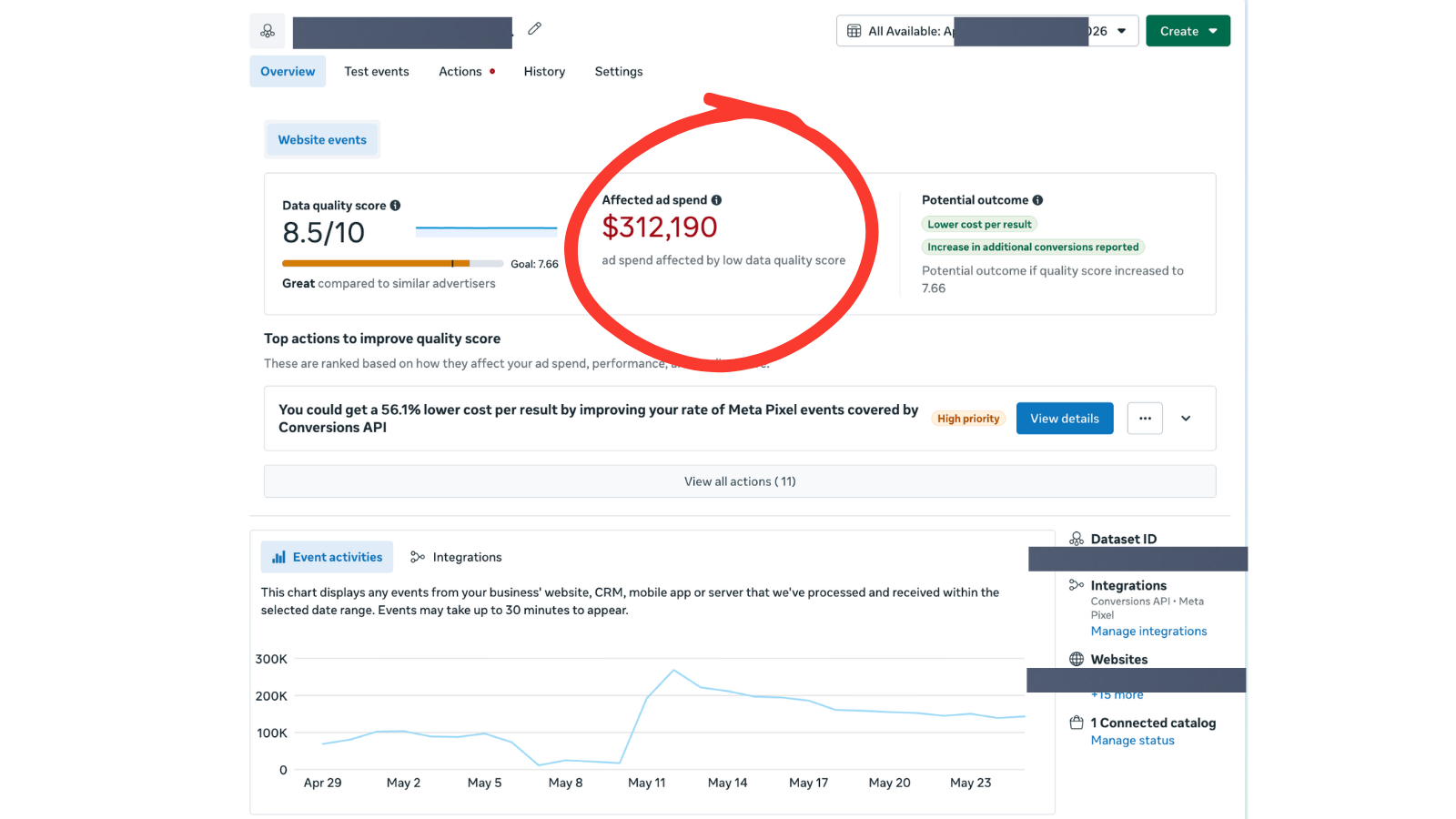
The Data Quality Score view that Step 2 grades. $312,190 of ad spend affected by low quality is the dollar reason this step exists. Everything in Steps 3 through 10 depends on this number being high enough first.
Step 3: Campaign structure. Does it mirror the site?
This step goes against what Meta's own customer success managers recommend. Their advice is generic. They don't know the business, the margins, the category, or the customer LTV (lifetime value). Their job is to keep spend on platform.
What the audit looks for in the structure:
- Does the campaign structure mirror the website's information architecture (IA, how the site's pages and categories are laid out)? If the site has four product categories, can those four categories be seen in Ads Manager?
- Even if it doesn't mirror, can a reader tell at a glance which category drives the most return? Which product within a category is the winner?
- Or has the account turned into a junk drawer? Duplicated campaigns, copy-of-copy-of-copy, no structural logic.
The pattern shows up in most accounts. Brands started day one with one or two products. They duplicated campaigns over and over. Now nobody can read the account. The structure didn't fail. It was never designed.
A useful test. Hand the account to the person running it and ask, "Which campaign is making the most money right now and why?" If they need more than 30 seconds to answer, the structure is broken.
For brands rebuilding structure from scratch, the campaign structure generator is the starting point we use internally.
Step 4: Naming convention. Can the account be read at a glance?
Most audits skip this entirely. It is one of the most under-discussed inputs to good ad management. Around 70 to 80% of accounts get it wrong.
The standard: a campaign name should reveal everything inside the campaign without opening it.
A campaign name like Conversion_Sales_Mar2026 reveals nothing. A campaign name like CONV_SuppCategory_BroadInt_15-65_M+F_Mar26 reveals the objective, the category, the audience signal type, the age range, the gender, and the launch month. Ten campaigns can be audited at a glance instead of clicking into each one.
A starting-point naming convention:
| Field | Format | Example |
|---|---|---|
| Objective | 4-letter prefix | CONV / TRAF / VIEW |
| Category | Short tag | SuppCat / SkinCat / FashionCat |
| Audience type | Signal label | BroadInt / LAL1 / CustomList |
| Demographics | Age + gender | 25-45_F |
| Date | Month + Year | Mar26 |
Two minutes of naming discipline at campaign creation saves hours of audit time later. And it adds up. Every new campaign launched into a clean naming structure inherits the readability. Every new campaign launched into a junk drawer makes the junk drawer worse.
Step 5: Account stage. Scaling, optimizing, or cost-cutting?
This is the step most audits skip. It determines what every other recommendation should be.
Before any single recommendation gets made, the audit asks: what stage is this account in?
Three options:
- Scaling stage. The account has product-market fit, the unit economics work, and the goal is to push more volume through the system without breaking it.
- Optimization stage. The account has a budget ceiling. The goal is to tighten the existing setup without growing it.
- Cost-cut stage. The business is under pressure. The goal is to defend the bottom line and stop the bleeding.
The same finding means three different things in three different stages.
Take a campaign with a 2.8x ROAS. In a scaling stage, that campaign is a winner that should absorb more budget. In an optimization stage, it is a steady performer that should be left alone. In a cost-cut stage, it might be the campaign that gets cut first because the next dollar's return isn't worth the next dollar of spend.
Most operators skip the question. They give the same advice regardless of stage. That is why their advice often doesn't match the business reality the founder is living.
For the full breakdown of the 4 stages and stage-specific tactics, see the 4 stages of a Meta account. For brands unsure which stage they're in, the scaling assessment walks through the diagnostic in five minutes.
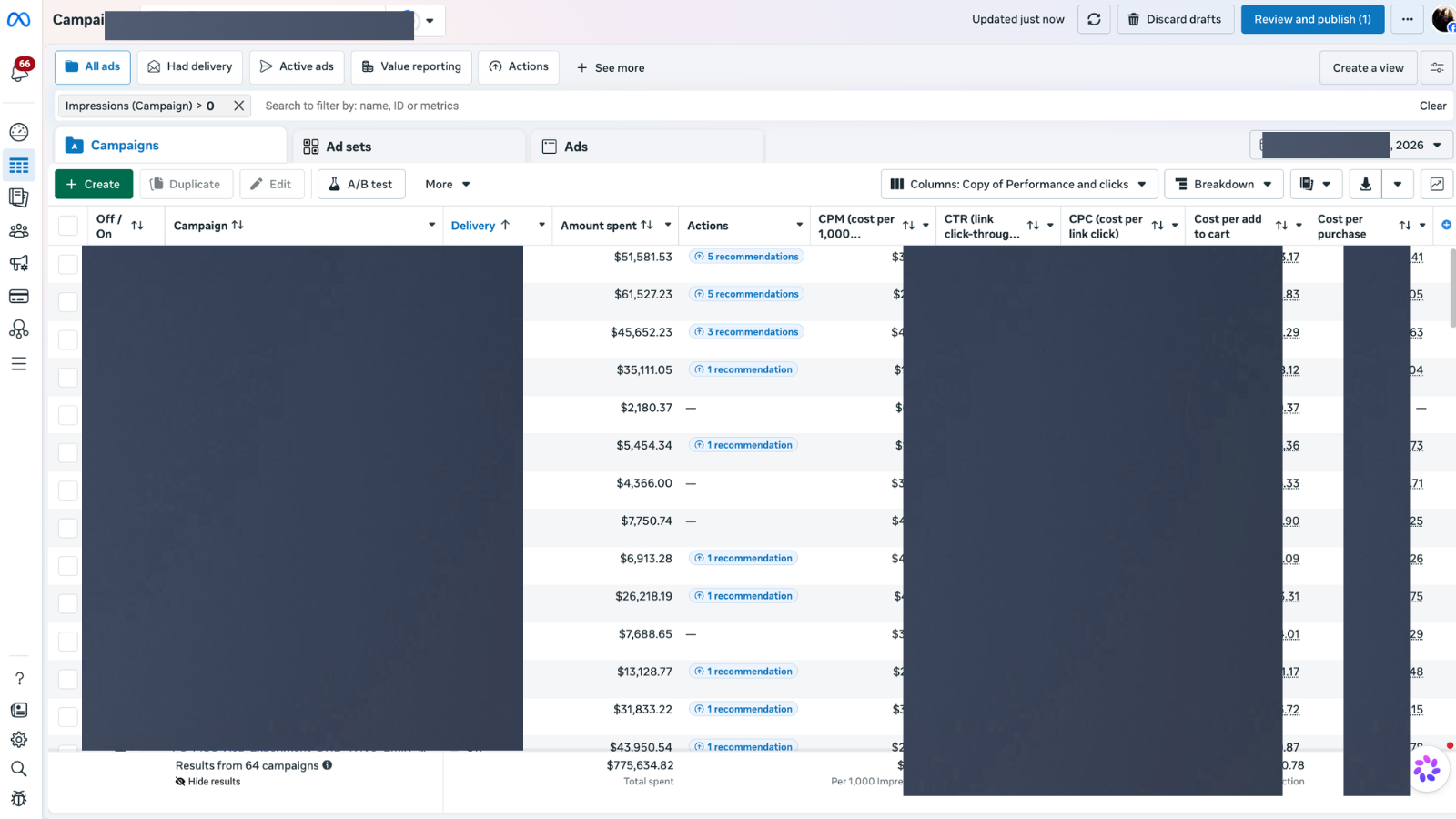
Step 5 in practice. The Delivery column (second from left) is the signal — campaigns in Learning Limited or with delivery issues at scale tell a different stage story than the same ROAS at Active delivery.
Step 6: Budget allocation. Does top spend match top return?
Once the account stage is known, the audit looks at where the money is actually going.
The diagnostic: pull the top spending campaigns and the top performing campaigns and see how much they overlap.
In a healthy account, the top 30% of campaigns by spend should drive roughly the top 30% by return. If the top 30% by spend delivers 50% of returns, there is leftover money on the table. Those campaigns can absorb more budget. If the top 30% by spend delivers only 10% of returns, the budget is funding losers.
The principle behind the play: budget allocation before bid adjustment. Budget gets pushed onto winners until allocation is maxed. Only then do bids go up. Bid increases push CPMs higher for the same return. They are the more expensive lever, and they only get used after the cheaper lever is exhausted.
For a quick reallocation pass, the ad budget allocator runs the math against any current spend split.
For the deeper question of what a good ROAS even is, the gross-margin formula behind a good ROAS walks through the math by business stage.
For the spend-tier-specific version of these leaks, the 7 most common leaks at $50K+/month walks through each with the diagnostic and the dollar impact.
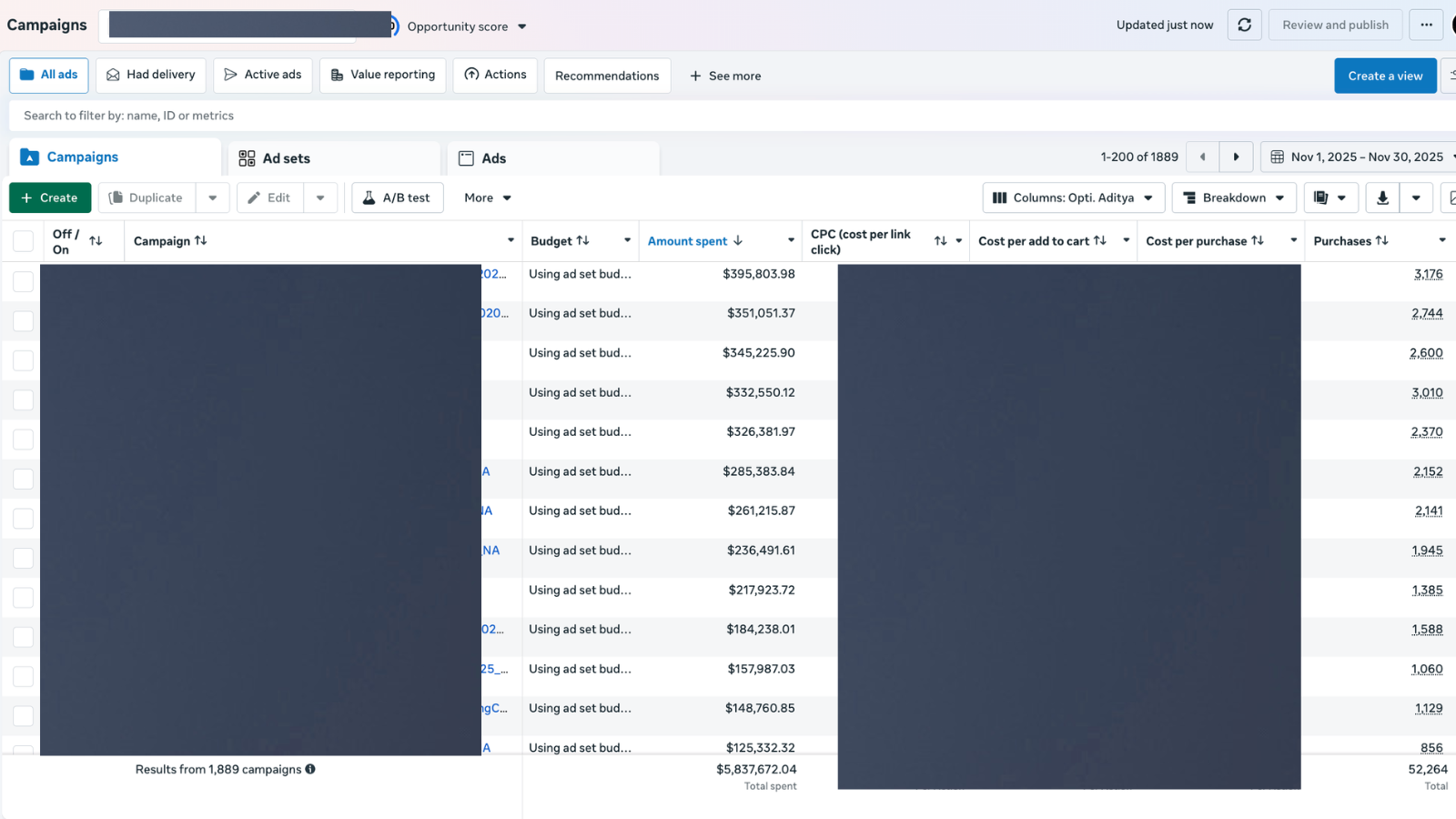
Step 6 grading at scale. Sorted by Amount spent, the top campaigns each running $200K+ in the period. The check: does the top 30% by spend drive 30% or more of returns? If not, the budget is funding losers.
Step 7: Cross-platform reality check (Meta vs Shopify vs analytics)
Meta tells one story. Shopify tells another. Analytics tells a third. The audit triangulates.
This is the step where almost every "Facebook ad audit" service stops short. Most auditors never leave Meta. That is the biggest blind spot in the category, because most leaks aren't in the ads. They're between the ad and the cash register.
What gets looked at, specifically:
- Drop-off from link click to session. If Meta says 10,000 link clicks and Shopify says 6,200 sessions, 3,800 visitors clicked the ad and never landed. That is a broken page, a slow load, or a mobile rendering issue.
- Conversion rate by category in Shopify. Is the category Meta thinks is winning actually converting on the site? Sometimes Meta's "winner" is a category with weak product pages, and the win is a mirage.
- Funnel drop-offs in analytics. Session to add-to-cart. Add-to-cart to checkout. Checkout to purchase. The biggest leak is almost never the ad. It is somewhere deeper in the funnel.
A composite example. Take a fashion brand running about $40K a month on Facebook ads. Reported ROAS was 3.2x. Solid creative, decent structure, no obvious campaign-level red flags. The leak wasn't in Meta at all. It was in the mobile checkout. The shipping calculator was timing out for 18% of mobile users at the address-entry step. The brand was paying Meta to send qualified, ready-to-buy customers into a checkout that silently broke before they could pay. Fix the checkout, ROAS lifts. Touching Meta wouldn't have done a thing.
That is why step 7 exists.
For a structured way to map funnel drop-offs without running the full audit, the funnel diagnostic walks a brand through it. For the full diagnostic on how to audit your checkout flow once you've identified it as the leak, see the mobile-first CRO diagnostic. The cross-platform reality check often surfaces a page speed problem inside the checkout. For the full diagnostic on that specifically, see mobile page speed, the hidden killer of D2C ad ROI.
The first seven steps cover the system around the ads. That is the part most audits skip. The next three cover the ads themselves.
For founders who don't have four to six hours, or who want a second pair of eyes from a team that has managed $147M+ across Meta and Google, the Free Quick Scan exists for that. A private 5 to 7 minute Loom walks through the leaks found on the account using public data only. Delivered in 48 hours. No account access needed.
Get Your Free Quick Scan →Step 8: Testing and signal hygiene
With the system checks done, the audit looks at how the account has been testing. Top-down. Category to product.
The biggest setup mistake shows up the same way in most accounts. Brands give Meta four signals at once. Demographics, behaviors, interests, and lookalikes (LAL, audiences Meta builds from a seed of existing customers), all in the same campaign, often the same ad set. They think they are being thorough.
They are confusing the algorithm.
The principle: the more signals Meta gets, the more confused the algorithm gets. Pick one signal type per axis. Lookalike campaigns, custom audience campaigns, and interest campaigns should be separated, not blended.
What good testing looks like:
- Non-overlapping audiences (Meta's audience overlap tool checked before launch)
- Structured creative tests (one variable changed at a time, not five)
- A clear hypothesis written down before the test starts
- Decision criteria fixed in advance ("keep this ad if CPO is below $X after $Y spend")
What bad testing looks like:
- Five new creatives launched on the same day with no plan
- Audiences rotating with no record of what was tested when
- Tests killed before they reach statistical signal because the operator panicked
The scariest version of bad testing is the one that looks productive. Lots of activity. No learning.
For the full discussion of when lookalikes still earn their slot and when interest targeting beats them, see lookalike vs interest targeting in 2026. Most accounts at $30K+ monthly spend run 4 to 7 stacked lookalikes when 2 to 3 clean ones would outperform.
Step 9: Creative and communication
This is the step the audit sits longest on. Once the system passes its checks, the creative is where the leverage is.
What gets reviewed:
- Hooks. Does the first three seconds earn the rest? If the viewer doesn't get a reason to stay past second three, nothing else in the ad matters.
- Angles. Is there variety, or is every ad the same pitch in different fonts?
- Value proposition. Is it clear in the creative, or buried in the third sentence of voiceover?
- CTA. Specific (
Get 20% off your first order) or generic (Shop Now)?
The review runs creatively, not just analytically. The numbers say which ads are tired. The creative review says what should change.
A truth that is getting harder to deny in 2026:
Creative is the new targeting.
For most of Meta's history, targeting did the heavy lifting. The right audience plus a decent ad worked. That era is over. With broad targeting becoming the default and the algorithm getting better at finding buyers, the lever has moved. Whatever the creative says is the targeting now. The ad sorts the audience. A boring ad gets shown to a boring audience. A sharp ad with a specific hook gets shown to people who respond to that specific hook.
Which is why the most valuable thirty minutes any team can spend on a Facebook ads account in 2026 is reviewing the creatives, not the audiences.
For the full defense of why creative is now the dominant lever on Meta (with the structural argument and the 4 hook archetypes that work on DTC), see creative is the new targeting.
For a structured way to map which creative types are running and which are missing, the creative types guide covers the standard 12-format library used in audits.
Step 10: Competitor benchmark
The final step uses the Meta Ad Library. The audit looks at what the big and good players in the category are running.
Not to copy. To find moves the brand could replicate intelligently.
Questions the audit asks:
- What hook angles are competitors using that this brand isn't?
- How many ads are they running concurrently? (If this brand runs 4 and a competitor runs 40, that is a structural gap, not a creative one.)
- What is their ad-to-landing-page consistency? Do their ads make a promise the page keeps?
- Are they running offers? What kind, and how often do the offers rotate?
The point isn't to clone. The point is to find the structural advantages that add up over time and build a version of them that fits this brand.
Where to start your audit
Not every brand needs to run all ten steps from cold. The right starting step depends on the symptom. Use the table below as a triage guide.
| Symptom | Most likely root cause | Start at |
|---|---|---|
| ROAS just dropped, no obvious cause | Pixel or CAPI broke; algorithm training on noise | Step 2 (data trust) |
| P&L doesn't match Ads Manager | Cross-platform attribution gap or checkout leak | Step 7 (cross-platform reality check) |
| Scaling has stalled at the same spend ceiling | Budget on losers; account stuck in optimization mindset | Steps 5 and 6 (account stage + budget allocation) |
| CPMs spiking with no clear cause | Audience overlap or competitor pressure in the auction | Steps 8 and 10 (testing hygiene + competitor benchmark) |
| Creative fatigue, but team is shipping new ads weekly | Same pitch in different fonts; no angle variety | Step 9 (creative review with angle scoring) |
| Account looks fine on the surface, gut says it isn't | Dashboard hiding the real numbers | Step 1 (dashboard hygiene), then full sequence |
Most common leak by category
The 10 steps don't change by category. The patterns inside each step do. The cheat sheet below maps the most common leak BTB Audits sees by category.
| Category | Most common leak | Found at step |
|---|---|---|
| Supplements | Cost-cut accounts run with a scaling playbook | Step 5 (account stage) |
| Fashion / apparel | Mobile checkout drop-off (shipping or address step) | Step 7 (cross-platform) |
| Electronics | Narrow creative variety because SKU range overwhelms testing | Step 9 (creative) |
| Baby and kids | Trust signals missing from landing page; ads outrun the page | Step 7 + Step 9 |
| Home and furniture | Long consideration cycle, budget split wrong by funnel stage | Step 5 + Step 6 |
| Beauty and skincare | Creative density war lost to bigger brands in the category | Step 10 (competitor benchmark) |
| Coffee / CPG | Subscription discount missing or weak; offer architecture flat | Step 9 (creative + offer) |
| B2B / SaaS lead-gen | Lead quality, not lead volume. CRM swap for Shopify in step 7 | Step 7 (cross-platform) |
What good looks like vs. what bad looks like
A summary table any operator can use as a self-check on their own account.
| Step | What good looks like | What bad looks like |
|---|---|---|
| 1. Dashboard | Custom column view, 10+ relevant metrics visible | Default 3-column view |
| 2. Pixel + CAPI | All events firing once, EMQ above 6, no duplicates | Events misfiring, low EMQ, Pixel-only setup |
| 3. Structure | Mirrors site IA, every campaign has a job | Junk drawer, copy-of-copy campaigns |
| 4. Naming | Campaign name reveals everything inside | "Conversion 5", "Test campaign 3" |
| 5. Account stage | Operator names it: scaling, optimizing, or cost-cutting | Same playbook regardless of business reality |
| 6. Budget | Top spend matches top return | Budget on losers, winners under-funded |
| 7. Cross-platform | Meta + Shopify + analytics reconcile within 10% | Meta says X, P&L says Y, nobody knows why |
| 8. Testing | One variable per test, written hypothesis | Five new ads, no plan, killed at day 2 |
| 9. Creative | Variety of angles, sharp hooks, specific CTAs | One pitch, weak hooks, generic CTAs |
| 10. Competitor | Library checked monthly, structural gaps known | Last looked at competitors a year ago |
If this self-check lands in the "bad" column on more than three rows, the account doesn't have an ad problem. It has a system problem. And no amount of bid adjustment will fix it.
For benchmarks against category averages, the ROAS benchmark shows what good actually looks like by vertical. Operators unfamiliar with any term used above can also use the Meta ads glossary.
A note on the other half: most brands also leak budget on Google
The 10-step method above is built for Facebook ads. Most paid ads brands also run Google Ads. The audit logic is similar but the diagnostic order changes. Search behaves differently from social, and the leaks live in different places.
The full Google Ads audit method covers that side of the picture. Brands running both platforms should audit them both. Treating Meta and Google as one bucket is one of the most common reasons brands cannot figure out where their actual returns are coming from. For brands also running heavy on Google Performance Max, the PMax audit checklist covers the placement-bleed pattern in detail.
For brands selling on Amazon as well, see the Amazon ads audit method. The order changes on a marketplace. You audit the listing and reviews before the bids, because the ad rides on top of the product page instead of creating demand on its own.
Frequently asked questions
Common questions
About the method
What is a Facebook ad audit?
A Facebook ad audit is a check of where money is leaking out of a Facebook ads account. A real audit runs in a sequence: data trust first, then performance grading, then creative. That ordering matters because early findings invalidate later ones if the order is wrong. The output is a list of leaks with dollar impact and a fix order, not a generic list of campaign-level tweaks.
Is this method specific to DTC brands, or does it work for SaaS and lead-gen too?
The 10 steps work for any Facebook ads account, but the diagnostic shifts. For lead-gen, step 7 swaps Shopify for the CRM, and step 9 weights toward form-completion creative cues over add-to-cart language. The skeleton stays the same.
How long does a self-run Facebook ad audit take?
About four to six hours for a focused operator who knows their account. Expect longer the first time, because most of the work is rebuilding the column view and the campaign naming so the rest of the audit is even readable.
What is the difference between a Facebook ad audit checklist and this method?
A checklist gives the items. The method gives the order. Order matters because finding a creative problem in step 9 means nothing if the Pixel is misfiring at step 2. Most published Facebook ads audit checklists are flat lists; this method is an ordered diagnostic.
About the BTB Audits process
What does the Free Quick Scan cover that this post does not?
The post explains the method. The Quick Scan runs the method on a specific account using public data only. The deliverable is a 5 to 7 minute Loom walking through the leaks found, plus a Leak Score, in 48 hours. No account access is needed.
How is the Forensic Report different from the Quick Scan?
The Quick Scan uses public data only. The Forensic Report includes full account access, all 10 steps run end to end, a 60-minute strategy call, and a prioritized 30-day fix plan. It is $499 and delivered in 5 to 7 days.
Trust and safety
Is it safe to share Meta account access for the Forensic Report?
Yes. BTB Audits uses Meta Business Manager partner access only, scoped to read-only where possible, and access is revoked the day the audit closes. There has never been a security incident across $147M+ in managed spend.
Why is the Quick Scan free? What is the catch?
There is no catch. The Quick Scan is the work, not a sales call. The economics work because if 1 in 10 founders who get a Quick Scan upgrade to a Forensic Report, the funnel pays for itself. If the Quick Scan is good, that conversion happens naturally.
Will this work for a specific account
Monthly Facebook ads spend is below $10K. Is the audit worth it?
Honestly, probably not yet. Below $10K a month, the highest leverage is in creative volume and offer testing, not in the structural fixes the audit catches. Run the post-level method shown above. Come back when monthly spend is higher.
Does the method change for supplements, fashion, electronics, or baby brands?
The method does not change. The patterns within each step do. Supplements brands tend to leak at step 5 (cost-cut accounts run as if they are scaling). Fashion brands leak hardest at step 7 (mobile checkout drop-off). Electronics brands leak at step 9 (creative variety too narrow because the SKU range overwhelms testing).
What if Meta Ads Manager and Shopify don't reconcile?
Some attribution gap is normal. Expect Meta to over-report by 10% to 25% versus Shopify because of view-through windows and cross-device. A gap above 30% is a step 2 or step 7 problem and the audit treats it as a leak, not a quirk.
What is a good ROAS benchmark for a Facebook account?
There is no single benchmark. A good ROAS is your break-even ROAS plus a 20 to 40 percent buffer, and your break-even depends on your gross margin. For the Facebook-specific ROAS benchmark question, see <a href='/blog/what-is-a-good-roas-for-facebook-ads-2026'>what is a good ROAS for Facebook ads in 2026</a>.
For the structural explanation of why Meta CPMs (cost per thousand impressions) have risen since 2020 and what to do about it on a $30K+/month account, see why $50 CPMs are the new normal in 2026. To check the CPM range for accounts that look like yours by category and geography, use the Meta CPM benchmark lookup. To check your own attribution inflation against the 10 to 25 percent normal-range guidance, use the attribution reconciliation calculator. To run this method as a tickable list with a printable PDF, see the complete Facebook ads audit checklist, or open the interactive checklist with progress tracking.
For the BFCM-specific scaling framework that applies this audit method to seasonal scaling, see the BFCM scale-up playbook. It is the 5-condition check an account has to pass before you push spend into peak week.
The 10 steps above are the full sequence used by BTB Audits, in order. A focused operator can run this on their own account in four to six hours.
For founders without four to six hours, or for those who want a second pair of eyes from a team that has managed $147M+ across Meta and Google, the Free Quick Scan exists for that. A private 5 to 7 minute Loom walks through the leaks found on the account using public data only. Delivered in 48 hours. No account access needed.
Get Your Free Quick Scan →Keep reading on Facebook ads
Aditya Chaturvedi is the founder of BTB Audits. He has managed $147M+ in ad spend across Meta and Google for DTC, SaaS, and lead-gen brands ranging from $10K/month to $500K/month. The 10-step method in this guide is the same one BTB Audits runs on every Forensic Report. Read more on the BTB Audits blog.
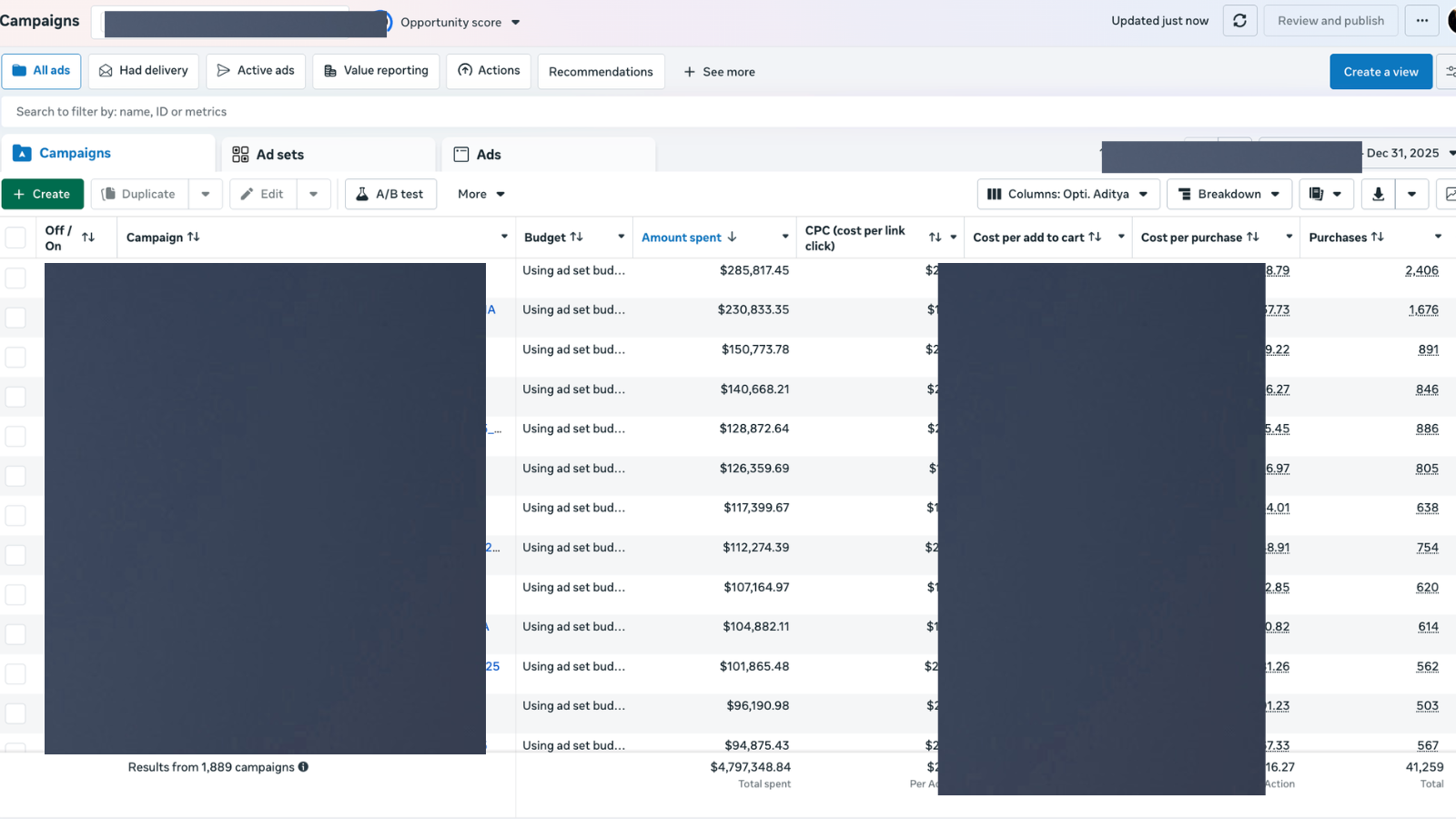
One of the accounts behind the $147M+ managed credential. Campaign-level spend in the high six figures, audited end to end with the same 10-step method.